Accounting reports for Odoo:each amount - to the entry and document
The trial balance report by account, analysis and account card, subaccount analysis, chess report - these are the reports that an accountant coming from 1C/BAS looks for in Odoo and cannot find. Now they are in Odoo 19 Enterprise: from any amount - a transition to the entries that make it up.
6 reports
Labelin one package
1 click
Labelfrom amount to entries
PDF · XLSX
Labelwith company and filters in the header
UA · EN
Labelreport languages
Why
Standard Odoo reports are for the owner and auditor. These are for the accountant.
The accountant has other questions: where did the amount come from, what did the account correspond to, what documents are behind the turnover. The standard reporting in Odoo does not cover them — the package specifically addresses them.
Where did the amount come from?
LabelClicking on any amount opens the entries that make it up — with the same period, company, and filters used to generate the report.
What did the account correspond to?
LabelThe account analysis and the ledger show the pairs of Debit/Credit that the package retains when processing the document, rather than guessing during the display.
What documents are behind the turnover?
LabelThe account card — each entry in chronological order with a cumulative balance. For inventory records, the "Primary Document" column opens the document that created them.
To the accountant and chief accountant
Labelwho is transitioning to Odoo from 1C/BAS and is used to linking each amount to a document. How we transfer data from 1C — on the page"Migration from 1C".
To the Odoo partner
Labelwho implements Odoo in a Ukrainian company: the package removes the accounting department's objections regarding familiar reports — without development.
Package composition
Six reports in one package
Five - in the menu 'Accounting → Reporting → Accounting Reports'. The sixth, service report, opens from the trial balance.
01
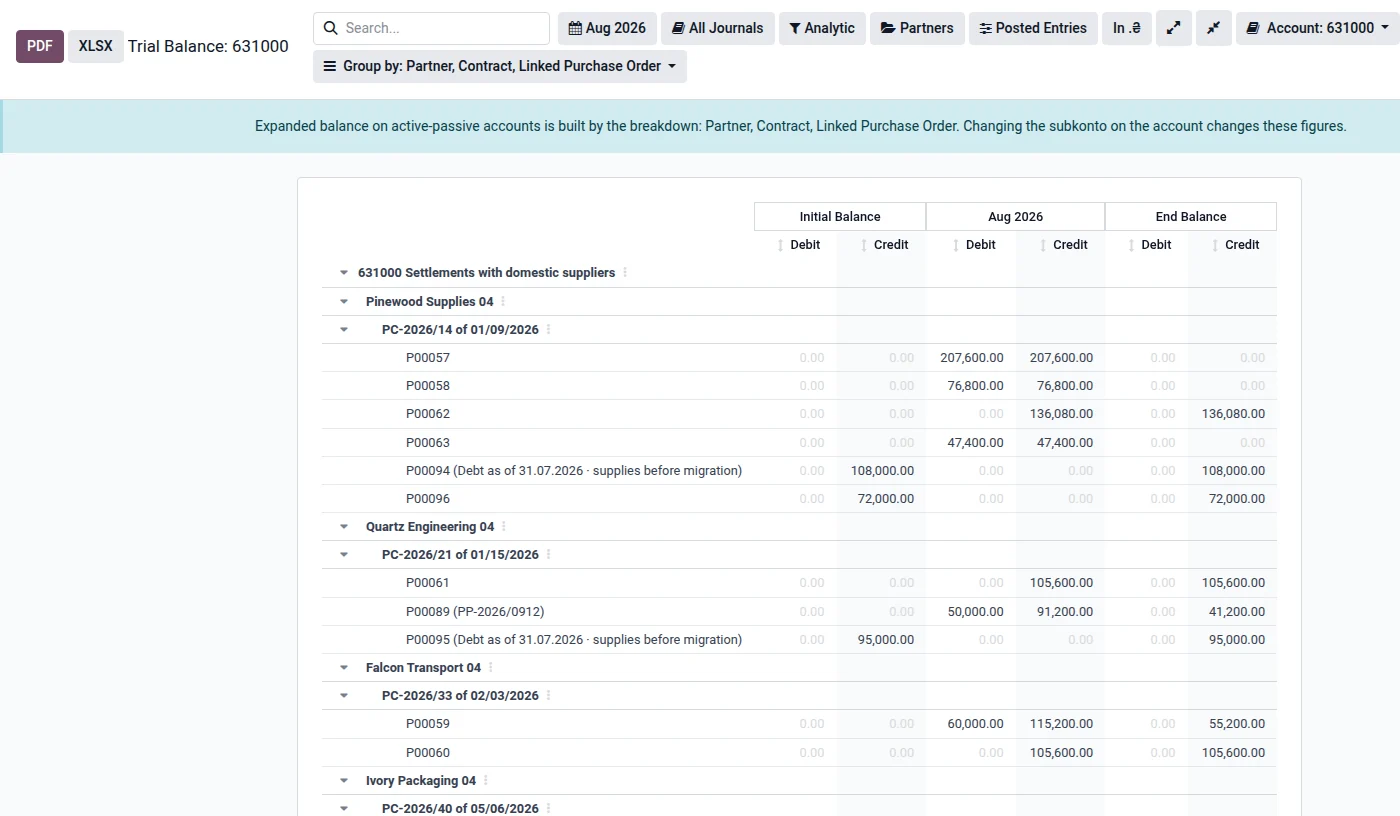
Trial balance report by account
Trial Balance by Account
Account turnovers and balances for the period broken down by selected subaccounts - partner, contract, order, product, or analytical account. The initial and final balances are detailed: debit and credit in separate columns, as required by Ukrainian accounting.
- multiple accounts at once in the report header
- sorting by clicking on the 'Debit' or 'Credit' column
- Odoo analytics - in separate rows, undistributed - in the row 'without analytics'.
- the report header indicates which specific number is shown under the breakdown.
02
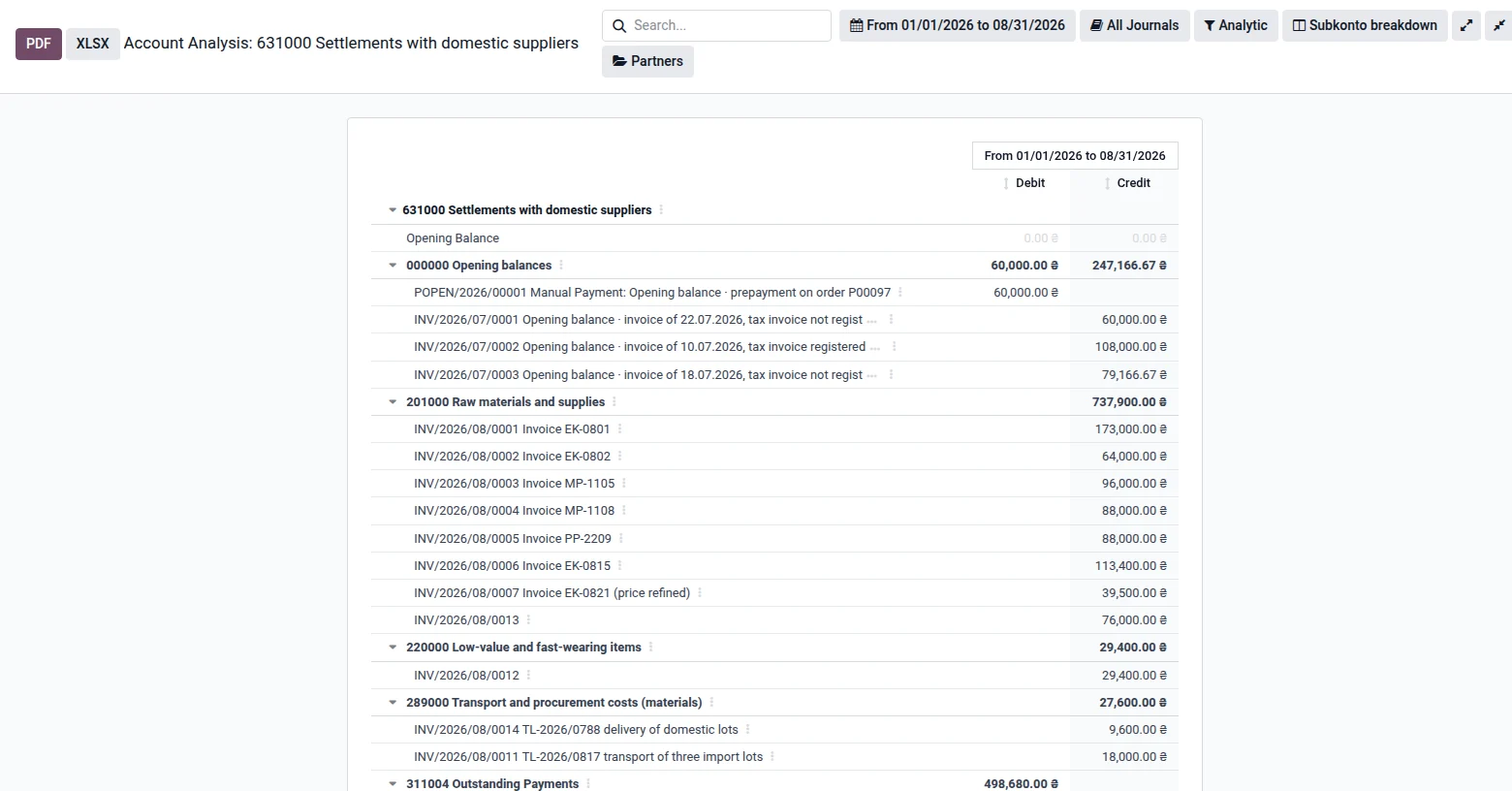
Account analysis
Account Analysis
Which accounts the selected account corresponded with during the period - broken down by subaccount and with documents for each amount.
- correspondence - from pairs saved during posting
- from the correspondent account - to each document
- the 'Primary Document' column for warehouse records
- from the account line - the same account in other reports of the package
03
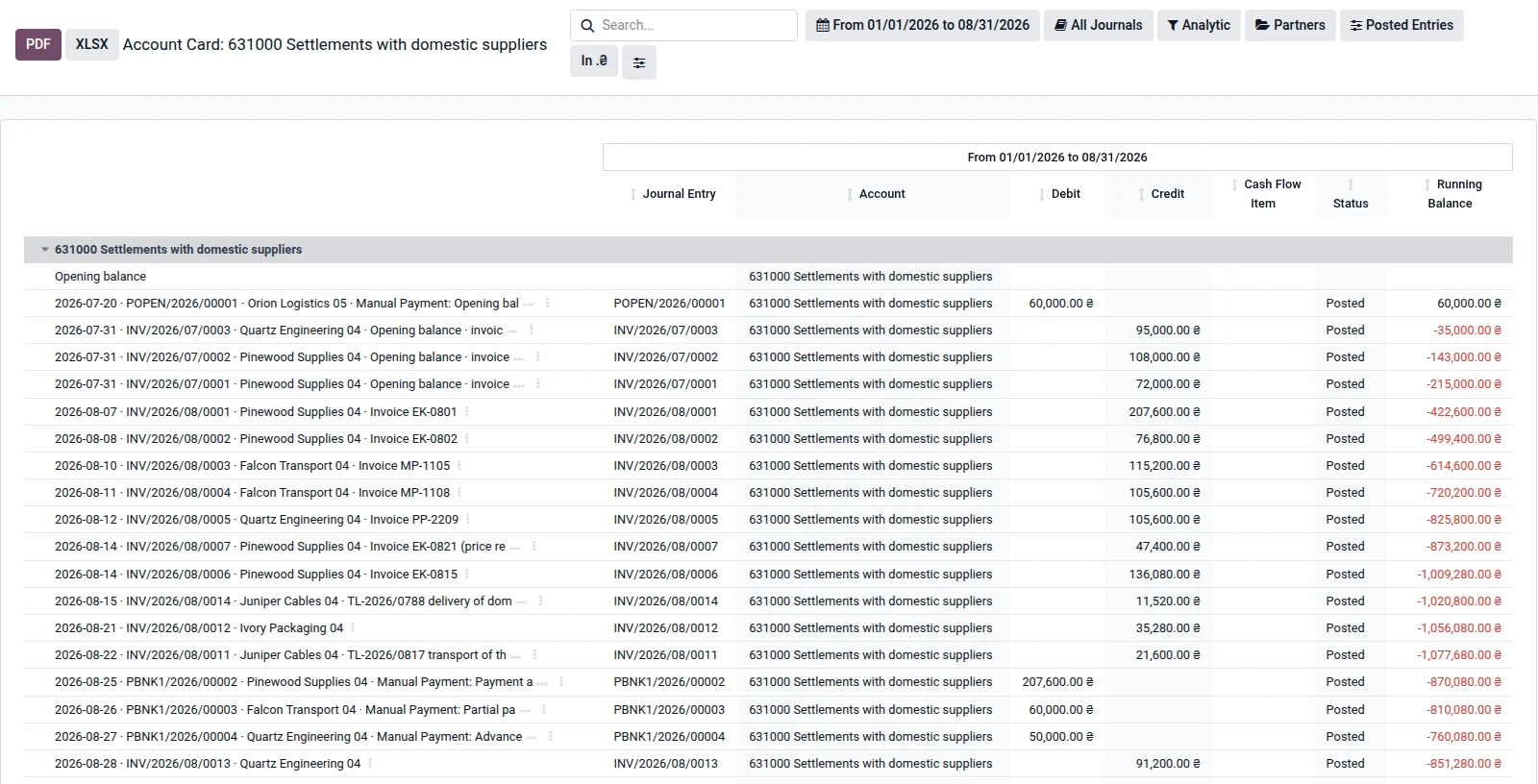
Account card
Account Card
All account transactions in chronological order: initial balance, cumulative balance after each entry, turnovers for the period, and final balance.
- twenty additional columns - activated when needed
- documents of the same day - in expected order
- the transaction line opens the document itself
- the 'Primary Document' column for warehouse records
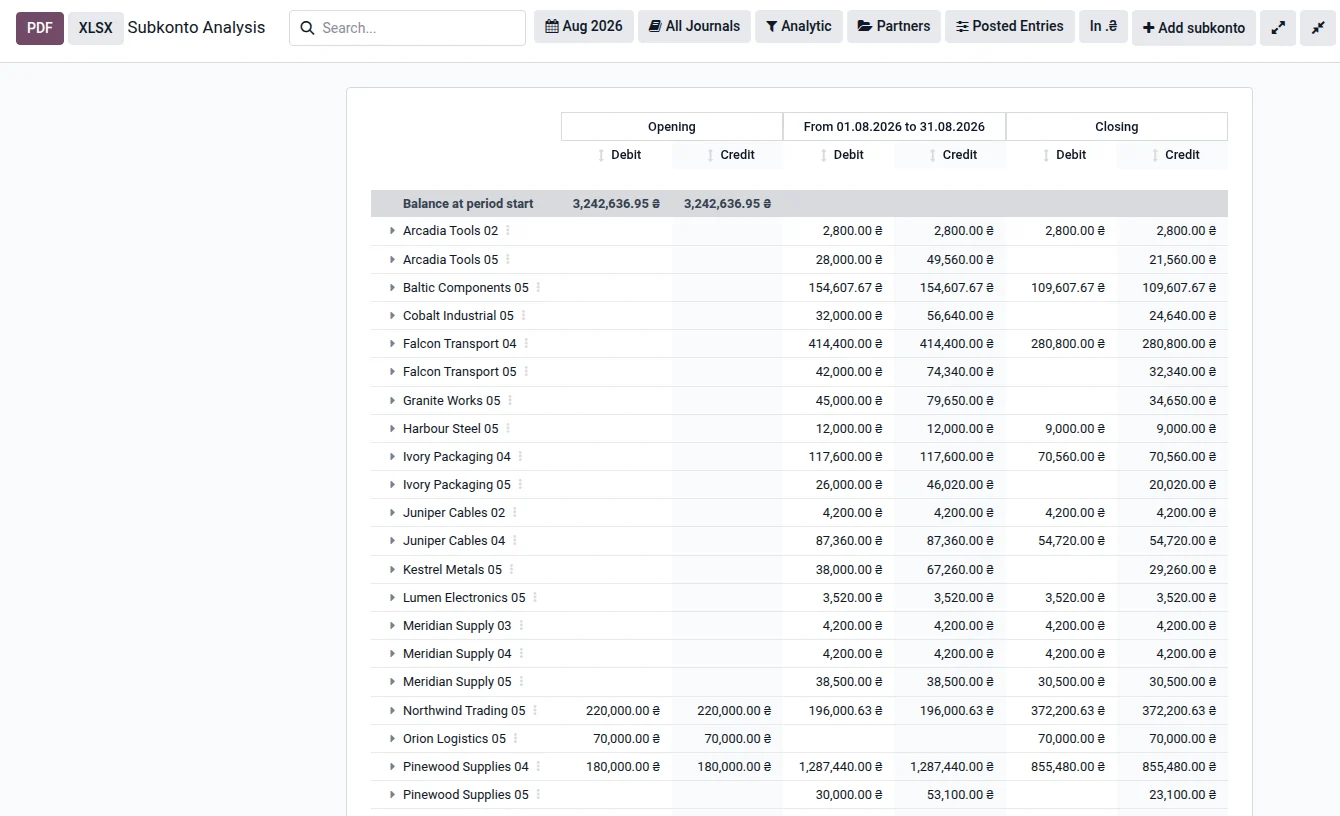
04
Subaccount analysis
Subkonto Analysis
Balances and turnovers in any hierarchy of cuts - by any field-reference of the entry and by the analytical plans of Odoo.
- Amounts are divided by the percentage of analytical distribution.
- The share that has not been distributed to anyone remains visible.
- The analytical filter reaches the click and the lines of entries.
- Cut levels are added with a button directly in the report.
05
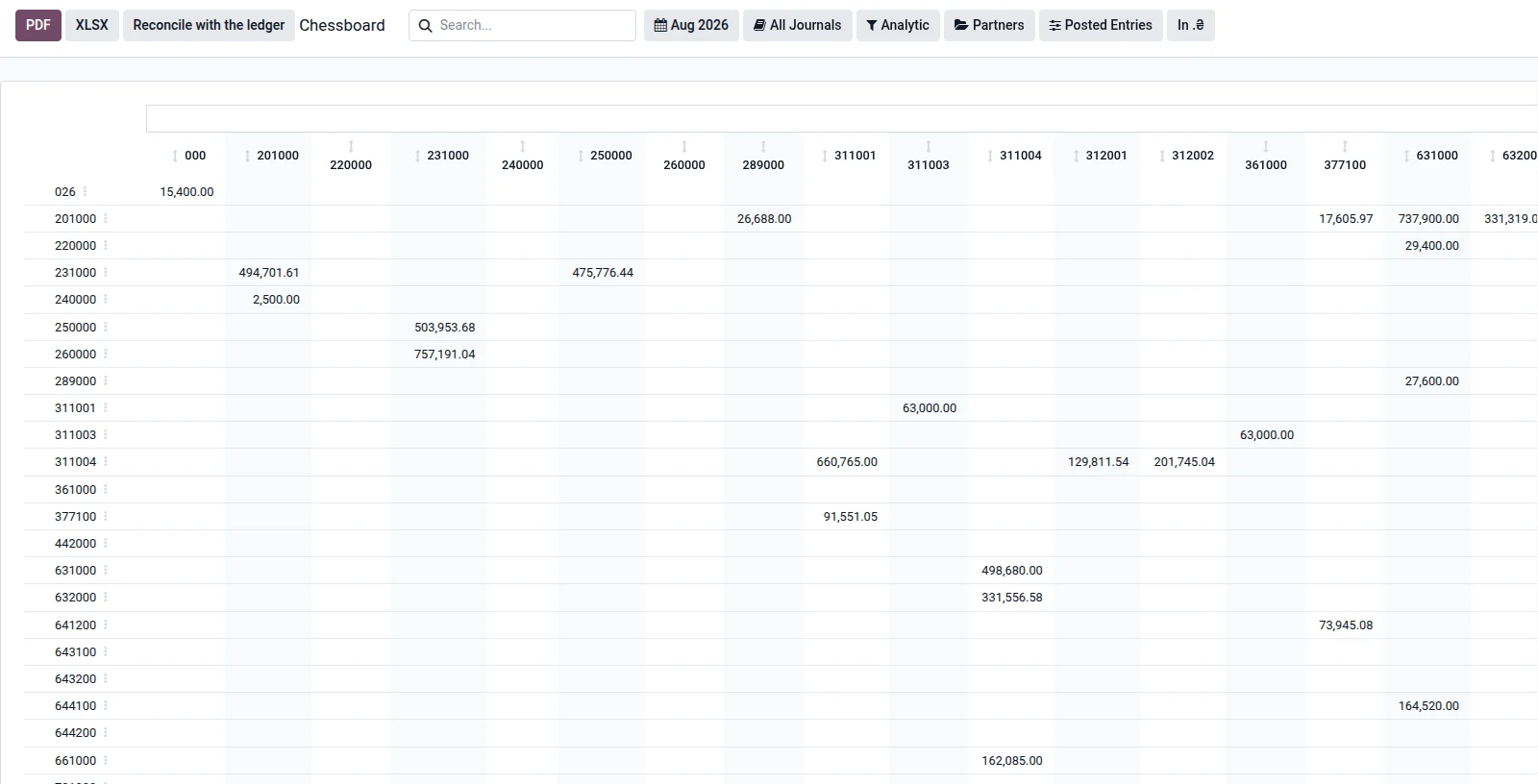
Chess report.
Chessboard
All correspondence for the period in one matrix, collapsed to the required level of code: class, synthetic account, sub-account, or full code.
- The cell, compiled by proportional distribution, is marked.
- Above the matrix - how many entries have been distributed proportionally.
- Reconciliation of all reports in the package with the general ledger - with one button.
- Over 8,000 cells - will suggest narrowing the period or taking XLSX.
06
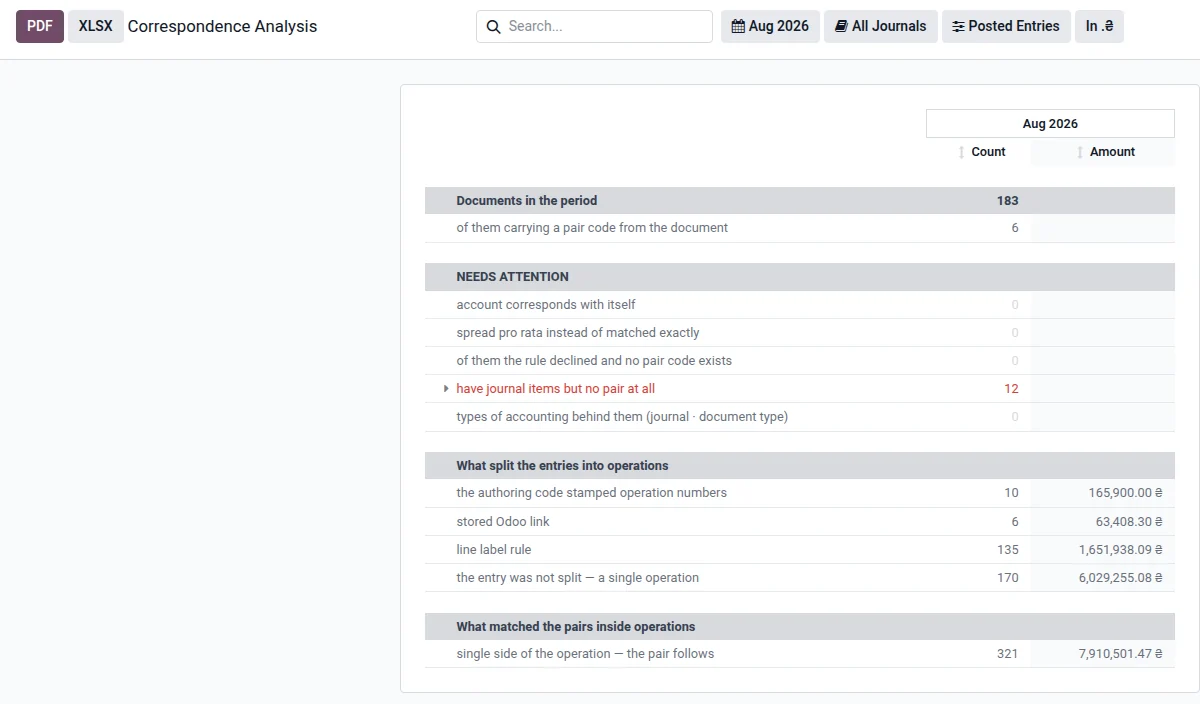
Analysis of correspondence.
Correspondence Analysis
Service report before closing the month: what broke down entries into operations, what matched pairs within them, and what needs a second look.
- Opens from the chess report.
- Does not appear in the daily accountant's menu.
- Shows documents without pairs and proportional distributions.
- In each line - the number of documents and the amount.
How it works.
Reports are navigated, not just read.
Each report in the package is the beginning of a route: from the summary to the entry, from the entry to the document, from one report to another - without losing the period and filters.
Each amount is clickable.
Clicking on the number opens the entries that make it up - with the same period, company, and filters used to build the report.
Reports know about each other
From the line of the account, you open the same account in any other report of the package. The period and account go along with you.
Correspondence is retained
Debit/Credit pairs are built once — when the document is processed, and all reports take them from there. The same amount does not receive two different explanations.
Printing retains context
PDF and XLSX — the standard mechanism of Odoo: company, period, and applied filters are in the header of the file, not just on the screen.
Access according to Odoo rules
The report only sees the company allowed to the user, and a user from one company does not read the correspondence of another. The 'Access Rights' groups are not needed for the accountant.
Reconciliation with the general ledger
One button reconciles all reports of the package with the general ledger and returns a list of discrepancies, not a verdict of 'everything is fine'.
Click verified by tests. The package's automated tests check: the amount clicked equals the amount of entries opened by the click — in both the Ukrainian and English interfaces.
Порівняння
Чого немає в стандартному Odoo — і що додає пакет
The package does not duplicate the standard reports of Odoo Enterprise, but adds those that are not included.
| Звіт або механізм | Odoo Enterprise | Бухгалтерські звіти UBM SOFT |
|---|---|---|
| Trial Balance | is | not duplicated — remains standard |
| OSV by account with cuts (subaccount) | no | is |
Account analysis with correspondence | no | is |
Account card with cumulative balance | partially — General Ledger | is |
| Subaccount analysis | no | is |
Chess report. | no | is |
Analysis of correspondence. | no | is |
Correspondence saved in the entry | no | is |
Розвиток
New in the package — October 2026
The package is being developed on Odoo 19: improvements come from real implementations and become part of the standard delivery.
Dr/Cr correspondence in the document
The tab in the journal entry shows pairs of accounts with analytics on both sides — directly in the document, not just in the report summaries.
02 Аналітика в ОСВ по рахунку
Account turnover with a schedule for analytical accounts in Odoo; not defined by analytics — as a separate line "without analytics."
03 Розрізи рахунків при встановленні
The chart of accounts master sets cuts from what is already in the system: goods — on material accounts and revenues, partner — on settlements.
04 Вікна запуску звітів
The "Period" field with seven quick options, memory of the last parameters, and personal saved sets.
05 Первинний документ проводки
The warehouse entry and each of its lines know the document that created them: a column in the card and account analysis, the "Entries" button in the production order.
Before purchase
Requirements and limits — in advance, not after purchase
We name them openly. Where the report hits a limit, it suggests what to do next.
What is needed
- Odoo 19 Enterprisewith the applications 'Accounting' and 'Warehouse'. There is also a version for Odoo 17 Enterprise on Odoo Apps.
- Not Community.Reports are built on the Odoo Enterprise reporting engine, so the package cannot be installed on Community.
- Ukrainian chart of accounts.The levels of the chess report — class, synthetic account, sub-account, analytical account — correspond to codes of 1, 2, 3, 4, and 6 digits.
- Nothing extra.No external services or third-party modules.
Де межі
- Printing expands everything.On a book with hundreds of thousands of entries, the report will warn, state the number of lines, and offer XLSX — it builds in seconds.
- Chess report — matrix.With over 8,000 cells, the report will suggest narrowing the period, collapsing the code level, or exporting the entire matrix to XLSX.
- Regulated reporting — separately.Balance, income statement, and tax reporting are formed by standard reporting and localization — about them on the page'Odoo for Finance'.
- Amounts, not quantities.The package does not handle inventory accounting: reports do not show quantities and balances in natural units.
No. All reports are built on the Odoo Enterprise reporting engine (module account_reports). It is not available on Community, so the package cannot be installed there.
Accounting users with 'Read Only', 'Accountant', or 'Administrator' rights. Access rights groups are not needed for working with reports, and a user from one company does not see the data of another.
Reports work on any chart of accounts, but the levels of the summary of the chess statement are named according to the structure of the Ukrainian plan — 1, 2, 3, 4, and 6 digits of the code. In a plan with a different structure of codes, these levels will remain unnamed.
No. The installation does not overwrite entries. New documents receive correspondence upon posting, historical ones only at your command, using the recalculation button for the period. The chart of accounts master changes the characteristics of accounts — balance type and segments — and shows a complete list of changes to the entry.
Yes, there is an edition for Odoo 17 Enterprise on Odoo Apps. The features from the 'New in the package' section are in the version for Odoo 19.
✽ Як почати
From demonstration to reports in your Odoo
Demonstration
We will show all six reports on the demonstration database and answer accounting questions.
Installation
The package is from Odoo Apps or from us. Reports appear in the menu 'Accounting → Reporting → Accounting Reports'.
Chart of Accounts
The master 'Configure Chart of Accounts for Reports' sets the balance type and segments according to the rules for the Ukrainian plan: it first shows what will change and only then records.
Support
We will customize the reports for your accounting and provide support after launch — more details on the page'Support'.
View reports on the demonstration database
We will show how to go from the account balance to the entry and document, and explain how to connect the package in your Odoo.
495 €
License in Odoo Apps
- Odoo 19 Enterprise · OPL-1 license
- all six reports — with one purchase
- there is a version for Odoo 17 Enterprise
Order an Odoo presentation
Fill out the form and we will contact you shortly