A accountant who has worked with 1C for years is waiting for analytical reports from the first month-end closing. By adding new settings and modules in Odoo from UBM Soft, you will be able to obtain this accounting detail tailored to Ukrainian accounting. At the moment when the standard Odoo reporting shows users profit, balance, and cash flow, our solution allows not only to see the summary figures but also to analyze cash movements in detail, track the relationships between transactions, control balances, and quickly find errors.
Below is a list of these reports, how they are similar to the usual ones from 1C, how to interpret the amounts, and who the "Ukrainian Accounting Reports" package from UBM SOFT is suitable for.
What accounting reports are available in Odoo for accounting according to the Ukrainian chart of accounts
The accountant needs deep detail every day: what makes up the turnover on the account, what documents are behind it, how the amount is broken down by counterparties, contracts, orders, etc. Odoo reports are built on transactions and analytical fields, so they can be adapted to Ukrainian accounting. The UBM SOFT package implements this in forms familiar to the accountant.
| Report in Odoo | 1C equivalent |
What question does it address |
|---|---|---|
| Оборотно-сальдова відомість по рахунку | Оборотно-сальдова відомість по рахунку | Обороти й залишки рахунку за період у розрізі контрагентів, договорів, замовлень |
| Аналіз рахунку | Аналіз рахунку | З якими рахунками кореспондував рахунок |
| Картка рахунку | Картка рахунку | Усі проводки в хронологічному порядку із сальдо після кожної |
Subaccount Analysis | Subaccount Analysis | Balances and turnovers in arbitrary hierarchy of cuts |
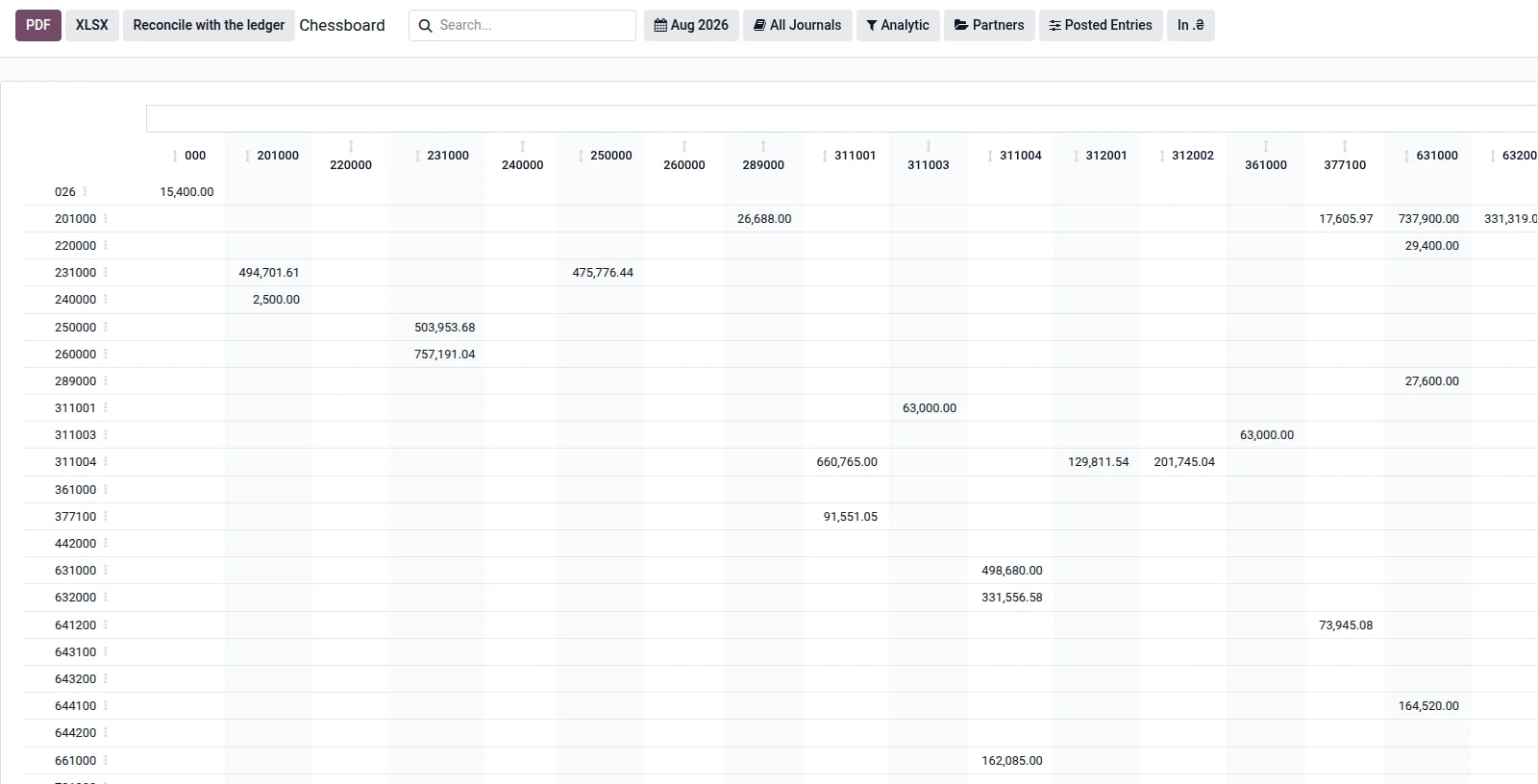
Chess record | Chess record | All correspondence of the period in one matrix |
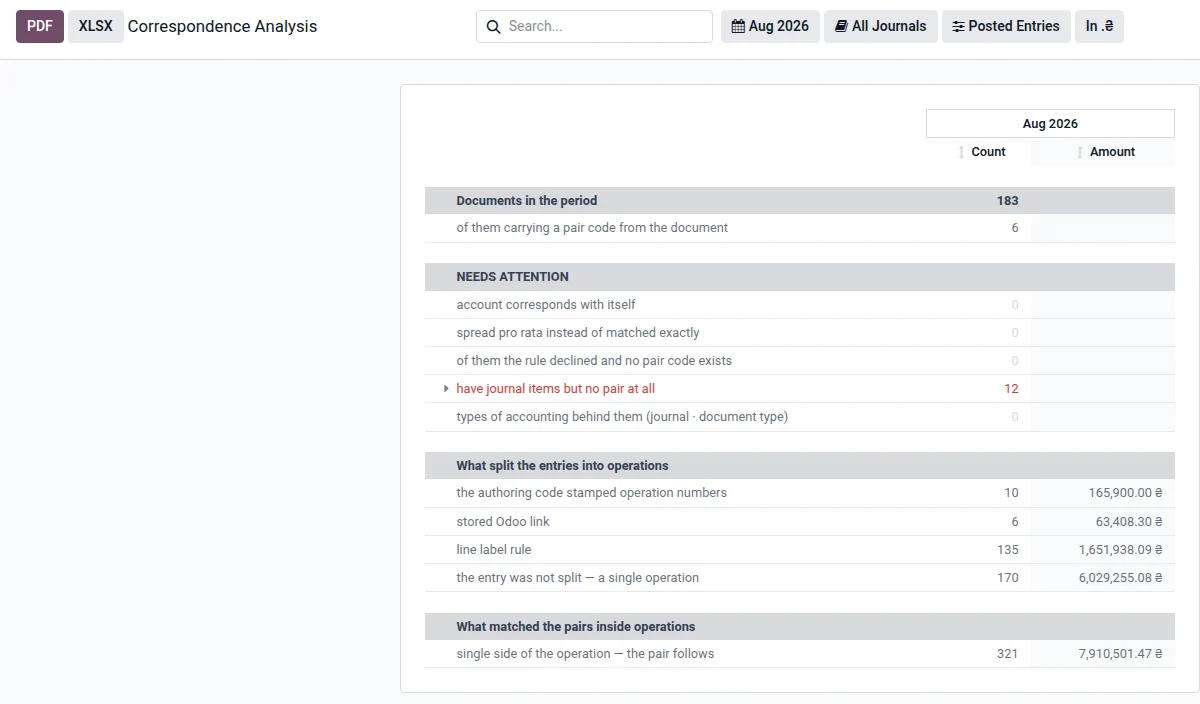
Analysis of Correspondence | There is no analog | Shows documents that are left without pairs "debit - credit" and their proportional distribution |
Trial balance report in Odoo
The report shows the turnovers and balances for the period by account. The opening and closing balances are displayed in detail: debit and credit in separate columns, as is customary in Ukrainian accounting. In Odoo, values are stored in one column, and the report expands them automatically.
Example. We take the accounts payable account and break it down by partner, contract, and purchase order. All three levels are visible in one report.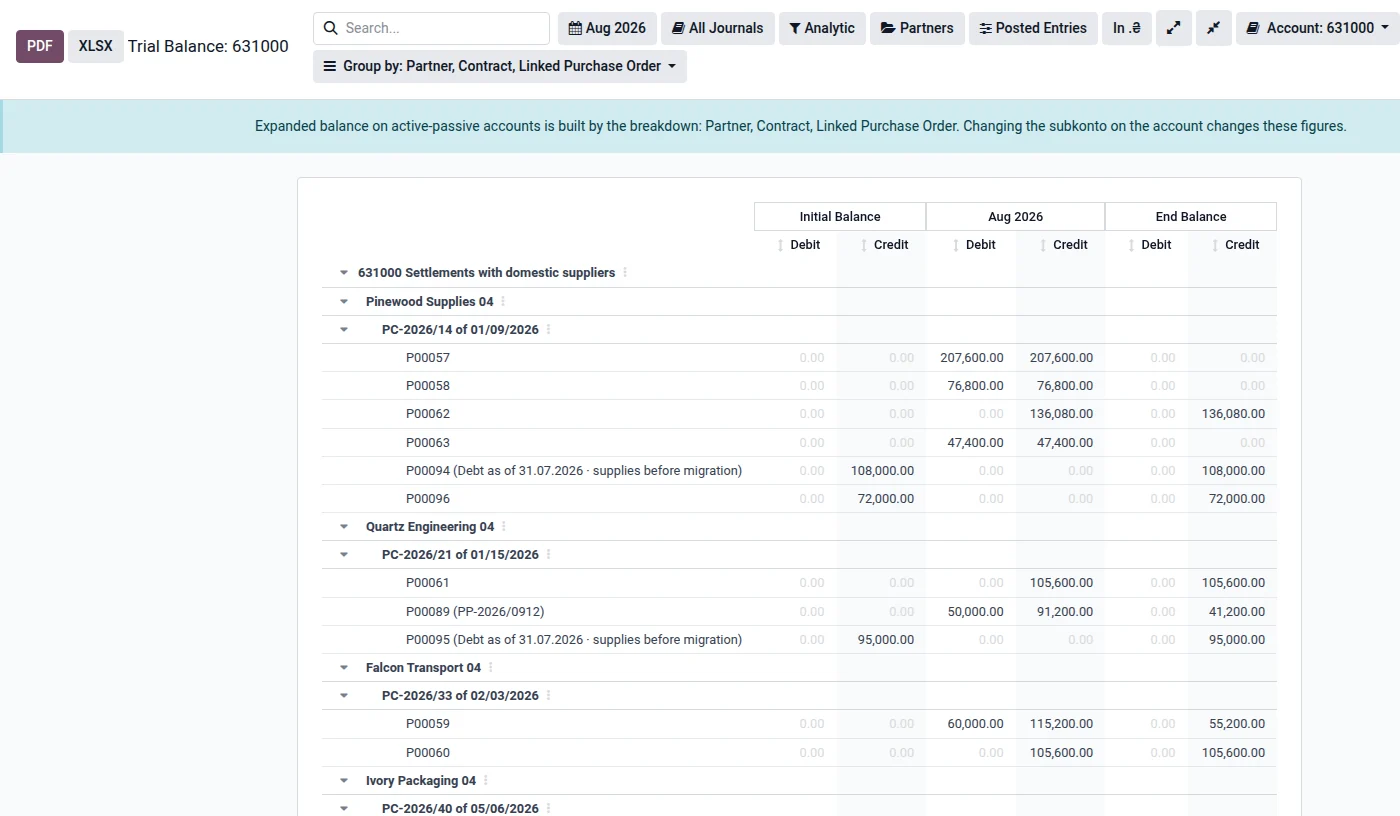
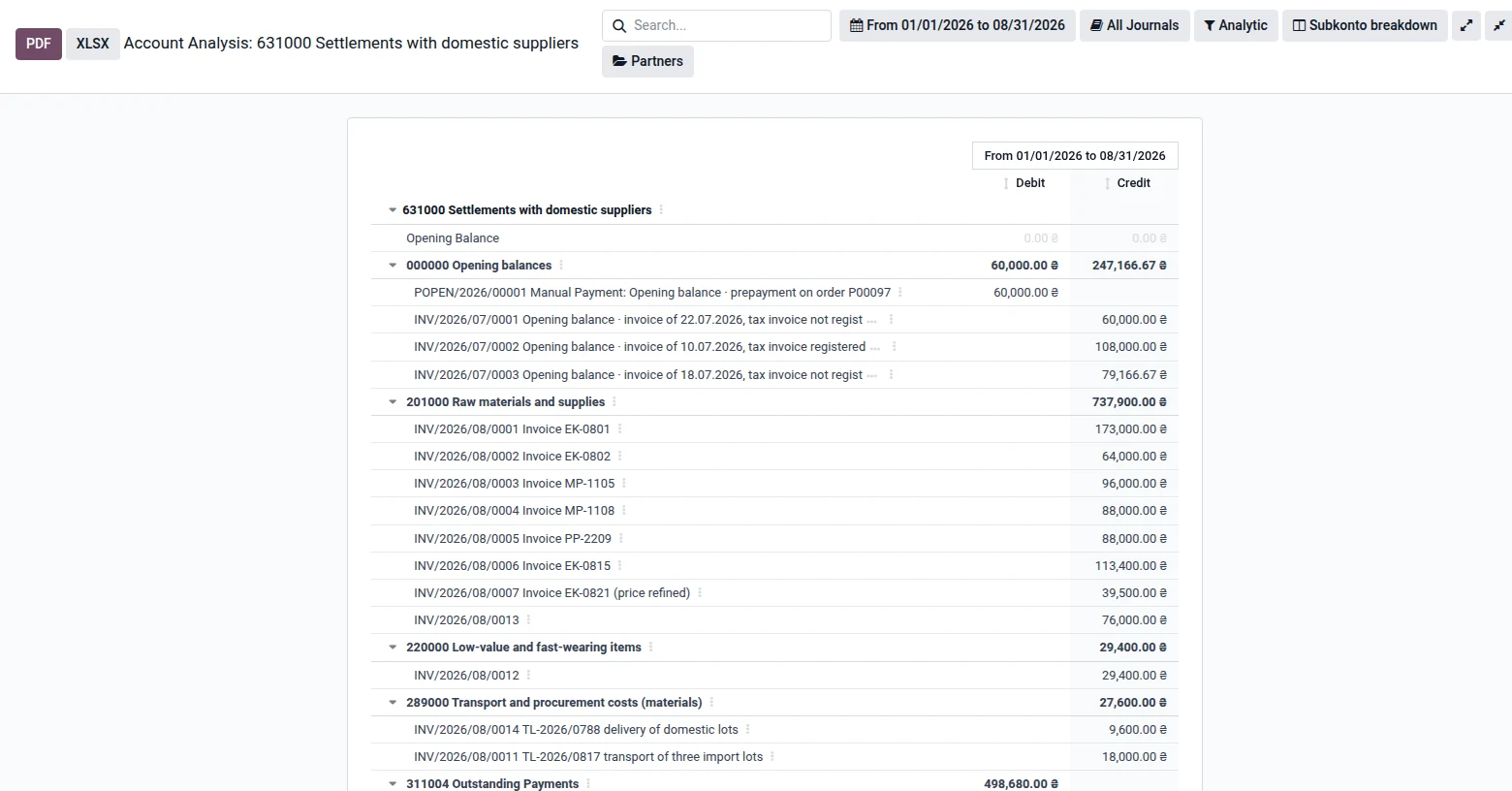
Account analysis in Odoo
The report shows which accounts the selected account corresponded with during the period. Documents that make up each amount are added, so entries can be opened with one click.
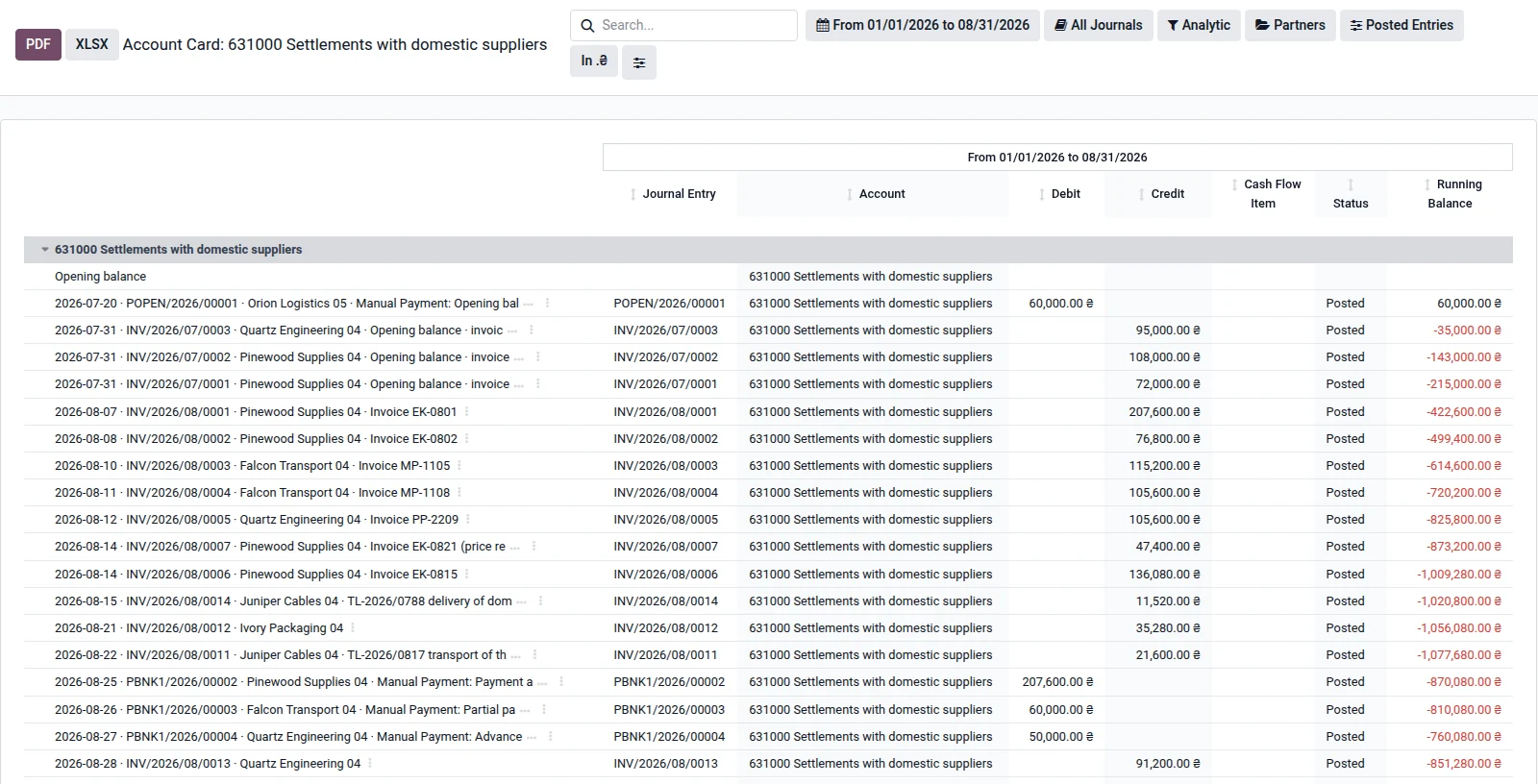
Account card in Odoo
The card contains all account transactions in chronological order: opening balance, turnover for the period, balance after each entry, and closing balance. Up to 20 additional columns can be enabled if needed, while the report remains compact by default. For example, 'Cash Flow Item', 'Status', or 'Primary Document' for inventory entries.
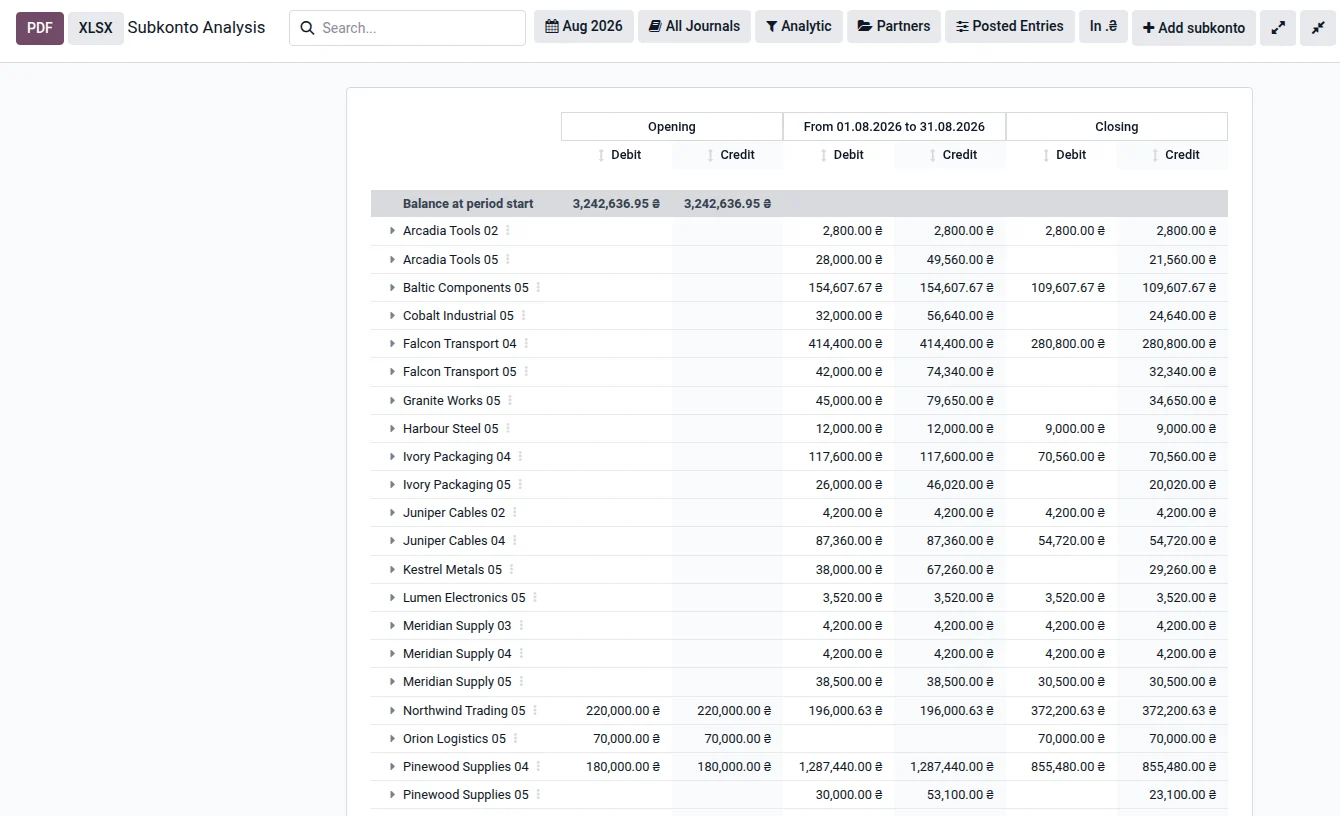
Subaccount analysis in Odoo
The report shows balances and turnovers in any hierarchy of cuts. A cut can be any field of the transaction that refers to another record or the Odoo analytical plan. Levels of cuts are added with a button directly in the report. If the amount is distributed among analytical accounts, it is divided according to the distribution percentage. The undistributed portion remains visible for control.
The checker report in Odoo
Шахова відомість показує всю кореспонденцію періоду в одній матриці. Її можна згортати до рівня класу, синтетичного рахунку, субрахунку або повного коду рахунку (наприклад, 631000). Це найшвидший спосіб побачити, як грошові кошти рухаються між групами рахунків.
Correspondence analysis before month-end closing in Odoo
An official report for the end of the period. It shows how transactions are grouped into operations, how 'debit - credit' pairs are matched, and what should be checked. Each line shows the number of documents and the amount. The report opens from the checker report; it is not available in the daily menu.
How to find the reason for an amount in Odoo in just a few clicks
The value of the package reports lies in how quickly one can trace back from the summary to the original source. A typical scenario: the balance in accounts payable needs to be reconciled with the act. For this, three reports are needed: the trial balance report, the account card, and the account analysis.
Open the trial balance report for the accounts payable for the required period and break it down by partner.
Find the counterparty and click on the amount. A list of transactions for the required period will open, in the same company and with the same filters.
Switch from the account line to the account card to see the balance after each transaction. The period and account move with you.
Open the account analysis and view the correspondence of amounts for full context.
Чотири принципи роблять це можливим:
Each amount is clickable. Clicking opens the transactions that make it up.
Reports are interconnected. Transitioning from one report to another retains the specified period and account.
Correspondence is stored in the system. The pairs of 'debit - credit' are built once for the document, so each amount has a single explanation across all reports.
Printing retains context. The header of the PDF and XLSX shows the company, its details, and the applied filters.
Для додаткової прозорості поєднайте звіти з журналом змін: [посилання: стаття «Audit Trail в Odoo: як захистити фінанси від правок заднім числом»].
Who is the "Ukrainian Accounting Reports" package suitable for and what to know before starting
The package will be a successful solution if:
you are transitioning from 1C and want the accounting to work with familiar reports from day one;
you need detail by counterparties, contracts, orders, goods, or analytical accounts.
Before starting, consider three conditions:
The package works on Odoo Enterprise. The difference between the editions is explained in the article [link: "Odoo Community vs Enterprise"].
It is available for version 19.0 in the Odoo Apps Store.
Evaluate the total cost of ownership along with support and updates: [link: "Total Cost of Ownership for ERP"]. Check the current price in the Odoo Apps Store.
Transitioning from 1C to Odoo
The approach to migration is described on the page [link: "migration from 1C to Odoo"], a step-by-step plan for the project manager, with roles, stages, and parallel accounting, see [link: "Transition from 1C to Odoo": only if the article has already been published]. The financial direction is on the page [link: "Odoo for Finance"]. You can also read about preparation for the e-audit in the article [link: "SAF-T UA and Odoo ERP"].
Yes. The Ukrainian localization from UBM SOFT includes the chart of accounts according to P(С)BO, tax accounting, and mandatory reporting. The 'Ukrainian Accounting Reports' package works on top of it: the levels of the summarized chess statement correspond to the codes of the chart with 1, 2, 3, 4, and 6 digits.
The 'Ukrainian Accounting Reports' package adds it to the menu 'Accounting → Reporting → Accounting Reports'.
Yes. Each report shows the companies that the user has access to.
The package is available for version 19.0 inOdoo Apps Store.For other versions, please check with UBM SOFT.
The accountant values the system for how quickly he finds the source of the amount and verifies it with the document. Six reports in the package provide the accountant with a familiar tool for daily work, while the owner and auditor receive clear figures that can be quickly verified.
UBM SOFT is a reliable Odoo partner in Ukraine, with over 50 implementations. We will help you configure Odoo for your business.