Odoo is a powerful ERP system that integrates customer relationship management (CRM), sales, inventory, accounting, and other business processes into a single space — instead of the chaos of inconvenient Excel spreadsheets and disparate programs.
But what happens after implementation?
A typical situation: the system works, but in a month or two, there is a need to change something. For example, a sales manager asks to add a field for 'last call date' to the client card so that they don't have to scroll through the correspondence history every time before contacting.
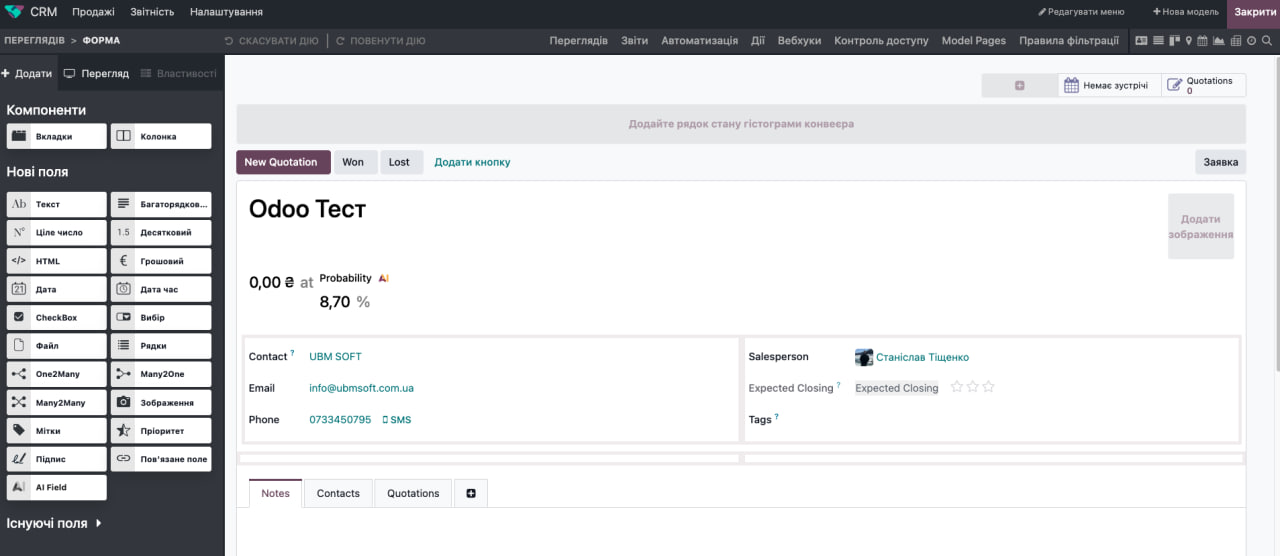
Odoo Studio interface: on the left is a palette of ready-made field types that can simply be dragged onto the form.
In many ERP systems, this means a long chain: assigning a task to a developer, waiting a week in the backlog queue, coordinating the technical specifications — for the sake of a field that is physically created in a minute.
Odoo has a tool that addresses this issue at its root — Odoo Studio. This is a built-in visual builder available in the Odoo Enterprise edition that allows you to modify forms, add fields, edit reports, and customize automation with simple drag-and-drop actions — without a single line of code.
Odoo Studio: what it is and who it's for
Odoo exists in two editions: the free Community and the paid Enterprise. Studio is one of the tools that most clearly shows the difference between them: it is physically absent in Community. This means that if your business plans to independently adapt the system to changing processes — not just once, but continuously, for years — Studio becomes not a bonus, but a key reason to pay for Enterprise.
Technically, Studio is an add-on to any Odoo module (CRM, Sales, Accounting, Inventory, Projects). It does not create a new program alongside the old one, but opens an editing mode directly in the familiar interface: you see the same deal card or invoice form, but now you have a panel from which you can add new fields, buttons, or blocks in seconds.
Who is the main user? Not the IT department at all. It is the heads of departments, business owners, and system administrators who work daily in Odoo and clearly understand what is missing for the effective operation of a specific process. Studio allows for the decision 'let's add a field' to be made and implemented instantly—without intermediaries.
Who is Odoo Studio most suitable for?
🏢 Business with atypical processes. Standard fields and reports of the system are often insufficient when a company operates in multiple markets simultaneously, accounts for specific industry data, or prepares unique documents.
📈 Fast-scaling companies. When each new partner or market dictates somewhat different rules of the game, waiting for a developer for every little thing is a lost growth momentum.
⏱️ Teams that are tired of waiting in line for IT. If small changes accumulate for weeks due to a lack of available hands in the technical team, Studio returns control to the people who work in the fields every day.
💡 If your business operates on stable, standard algorithms, and basic reports and forms are completely sufficient — there is no urgent need to buy Enterprise just for Studio. In this case, Community will cover the basic tasks.
What can be done in Odoo Studio without code
📝 Fields and forms
Adding new fields to any entity in the system (customer, product, deal, order) is a top task for Studio. Text fields, dropdown lists, calendar dates, or links to other objects are added by simple dragging.
Example from UBM SOFT's practice: When we implement CRM for clients with their own sales funnel, standard fields are almost always insufficient. Small custom fields like "object type," "tender stage," or "lead source" distinguish a live CRM that the team uses daily from one that is only opened once a week for reporting to management.
📄 Reports and printed documents
Templates for invoices, commercial proposals, or waybills are now edited visually. Logos, block layouts, adding details for a specific country or partner — all of this is done in a matter of minutes without involving a programmer in every design iteration.
⚡ Automation and notifications
Studio supports simple scenarios based on the logic of 'if - then':
Automatic email notification to the manager if the deal is overdue by more than 3 days;
Automatic change of order status as soon as payment is received;
Setting the priority to 'Urgent' if no responsible person is assigned within a day. This completely removes routine oversight from the sales department manager — the system highlights where attention is needed.
🔒 Access rights and interface
Flexible configuration of which fields a specific employee can see and edit, as well as hiding unnecessary sections for certain roles, reduces the risk of errors. For example, for a warehouse manager, financial fields in the order card can be completely hidden, leaving only what pertains to logistics and availability.
Where are the limits of Odoo Studio's capabilities?
Studio is ideal for targeted refinements, but it does not replace full-scale development.
✅ When Studio is sufficient: The task can be described in one sentence ('add a field', 'change a document template', 'set up notifications'). These are changes at the detail level that do not affect the global logic of the system.
❌ When a developer is needed: The task description sounds like 'the system must automatically calculate...' with numerous interdependent conditions, complex mathematical algorithms, deep integration with external API services, or the development of new business logic from scratch.
🛠️ Practical rule: Studio handles well what adds details to an already established process but does not change its fundamental architecture.
Risks of making changes in the system on your own: how not to cause harm
The freedom to customize requires a certain level of internal discipline. The most common pitfalls:
Chaotic changes: Several employees edit forms simultaneously without coordination, confusing the data structure.
Database "clutter": New fields are created easily, but old and unnecessary ones are often forgotten and not deleted, causing the system to accumulate "junk" over the year.
Reporting disruption: Deleting a field that is actually used in internal reports or automations can silently break the working logic.
It is impossible to damage the core or code of the system — Studio does not provide direct access to the source code. However, it is possible to confuse the data structure with duplicate or forgotten fields, so the change process is best kept under the control of one responsible administrator.
Yes. Customizations made in Studio are included in the standard database upgrade when transitioning to a new version — Odoo automatically transfers them along with the update, unlike custom code, which requires separate adaptation. The main condition is that the Studio application must remain installed and active at the time of the upgrade.
There is no one-click "undo" button. Reverting a change made in Studio requires developer mode — you need to find the corresponding interface element in the technical menu and delete the record manually. Therefore, for risky experiments, it is best to test the settings in advance on a copy of the database.
💡 Tip: Designate one person in the company responsible for changes in Odoo Studio, and keep a basic record of which fields were added and why.
Odoo Studio takes the headache out of any implementation — the dependency on a developer queue for every little thing. It works best not as a replacement for a systematic approach, but as its logical continuation: when the basic architecture is set up by professionals, and your team can flexibly adapt the details to their needs over the years. That’s why for a business that aims to grow without brakes, Studio is a strong argument for choosing Enterprise. You’re not just buying software; you’re buying the speed with which your business responds to changes.
Do you want to test Odoo Studio?
Leave a request for a free demonstration — we will demonstrate the capabilities of Odoo Studio in practice, using your business processes as an example!